
• Skip to main content
  • Skip to primary sidebar
HAHosting Logo. Four Blue Squares. Blue text HA, Grey Text Hosting as a single word

Call Us Today 0114 228 0022

Status Page   |  Client Login   |  Support Ticket   |  Downloads

Call Us Today
0114 228 0022

Chris Allen

#2 Types of Online Backup

20/12/2018 by Chris Allen Leave a Comment

Watch our short video guide below – giving you the rundown on the most common types of Backup which can benefit your business:

A Step Forward

So, you’ve decided that backup would be good for your business, that’s a step in the right direction. However, with so many backup options available it can be more than a little overwhelming to figure out what it is exactly what you would need! That’s why we’ve done the grunt work for you! We’ve collated everything you need to know about different types of backup and translated it from the technical jargon into a form that most normal people will understand.

Take a look below at the different types of online backup available.


Full Backup:

This is typically what people think of when they hear the term backup. This consists of backing the whole file or database each time a backup is performed. Generally, these are used at the start of a regular period for a business’ backup and then other backup types are used to add to this and avoid long backup times. These days after the first full backup, later full backups are synthetic in that they are created from existing full and incremental backups. Also, a full backup can mean an entire file, not necessarily the entire machine.

Pros: Cons:
  • – Standalone backup you can restore from
  • – Quick and easy to Restore
  • – Enable you to restore data
  • – Takes longer than an incremental 


Incremental Backup:

After a full backup is performed, incremental backups can be used, these will only backup any changes detected from the previous full or incremental backup – thus reducing the time needed to backup.

The downsides to this used to be that the restores would take longer as it would restore the full backup, then an incremental, then another etc. However due to the advancements in backup technology that is no longer an issue – you can now simply choose where you want the backup to restore from, this is due to the increments not being kept on separate disks anymore.

Pros: Cons:
 

  • – Much quicker than performing full backups
  • – Will only backup additional changes


  • – Not standalone used in conjunction with a full backup
  • – If one increment is lost/corrupted, then a   full restore past that point isn’t possible

Files and Folders:

As the name suggests this is backup specifically targeted at protecting data held in folders, files, documents etc. According to Solarwinds MSP 70% of workstations are not backed up, despite this people are constantly storing important data locally. Backing up these files don’t take long at all, depending on file sizes of course, is fairly cheap and can easily be backed multiple times a day. A big benefit of this service is that you can access and restore your files from anywhere and so comes with more utility than just backup. Most backup software will have an option to backup just files/folders meaning you also have the choice to suit your needs.

Pros: Cons:
 

  • – Simplest Backup Type
  • – Individual files can easily be restored
  • – Restore to anywhere


  • – Doesn’t protect the operating system.
  • – Or Applications


Application:

This type of backup is used to backup application data, for example this is commonly used for databases or email systems where data is not held in flat files. Application backup is usually an option from a more advanced backup software. This type of backup simplifies the process of managing database and the log files which both need to be managed simultaneously.

Granularity, rather than restoring an entire mail server, gives you the ability to restore a single email account for example. Features like this are important/convenient for businesses that have email accounts with a lot of important information on them, or other similar databases. Depending on the application you use will depend on how easy it is to find backup software that is compatible with it. For example, more obscure database services will be harder to accommodate compared to something more common, like MS SQL.

Application backup software often allows for a targeted restore which reduces the time significantly compared to a full restore. Again, this makes it easier to accommodate to your time frame/needs.

Pros: Cons:
 

  • – Application specific
  • – Simplifies the process
  • – Special features per application


  • – Not all applications are catered for
  • – Software can require additional licenses


Bare Metal:

A bare metal backup is used when a whole server restore is needed. This goes as far as restoring the operating system, hardware drivers and optionally all the data. Everything is restored which is why it’s called ‘bare metal’, as in the hard disk in the usual medium on which a computers OS is installed on. This is generally only used when hardware failure, major corruption or a particularly bad virus is present.

The system must be restored to a state prior to this. This isn’t usually a common occurrence. This of course takes much longer than a regular full backup as there is much more to copy/restore.

Pros: Cons:
 

  • – Quicker and easier than installing and              configuring the OS
  • – Can restore a whole system
  • – Good for server hardware failure
  • – Good against corruption/viruses


  • – Usually only Windows
  • – Additional cost involved


Archive:

This style of backup will create archived versions of data at fixed intervals for example at the financial year end. You can then go back to that point in time to review data if you ever need to. Generally, backups have a 30-day data retention period, i.e. the period of time from which you could choose to restore from. An archive backup is designed to be kept much longer, maybe indefinitely. Archival backups are useful for adhering to legal and compliance obligations.


Pros: Cons:
 

  • – Archiving offers a lot of utility if it is needed
  • – Management of historical data
 

  • – Data storage requirements increase the      more points in time you are required to         keep
  • – Additional cost involved

General Pointers:

For all the above services it’s usually fairly standard for a 30-day retention period for the data, this is to balance storage costs with usefulness of the backup. Sometimes it can take days or weeks to realise that data has become corrupt or is missing, if you only keep backups for seven days this would be a problem.  It is possible to have shorter retention periods if it suits your needs but 9 times out of 10 the 30 days is a good starting point.

Often you can unlock additional features in backup software with the purchase of additional licenses, which means you don’t have to change your software completely every time your requirements change.


Still Not Sure What You Need?

There is a lot of information to take in and while we’ve only gone over the basics of which each type of backup is/what it does, it’s perfectly reasonable to still not be quite sure what is best for you, it can be a pretty overwhelming topic if you don’t have much previous knowledge about it. Not to worry if that’s the case, just drop us an email or give us a call and we’ll be happy to help you out! You can get our contact information/make an enquiry here.


Want to Know More?

If you want to know more about any of the mentioned services, how they can be best used in your business or more technical info such as specifications we’ll be releasing another guide in the near future covering all of this! Alternatively, you can look at the backup product pages of our website.

Filed Under: HA Hosting Guides

#1 Intro to Online Backup

14/12/2018 by Chris Allen Leave a Comment

Watch our short video guide, introducing you to the basics of online backup:

An Ever Present Threat

We all know that data loss can be the cause of devastating issues for business of all sizes, with potentially crippling after effects. You could have heard about it on the news or online, had it happened to someone you know or maybe even have suffered from it yourself.

Think if you’ve ever lost a lot of family photos from your camera or computer and how bad it felt when you realised, you’d lost them for good – wishing you’d copied them over to your computer beforehand. The same thing applies to your business’ data.

The worst part of data loss is that it can happen at any time, to anyone without any warning. Have you ever given any thought to what would happen to your business if you were hit by unexpected data loss? In a best-case scenario, it can be frustrating, and in a worst-case scenario the results can be devastating – particularly if you’re business is dependent on that data, like databases of customer information or internal resources used by yourself or staff regularly.

Imagine the potential cost, not just monetary, but the potentially considerable time it would take to get back to your current point. Would your downtime cause new customers not to be able to use you? Or maybe existing customers might leave because they need the service regularly?

There is a solution that can prevent all of this and is quite simple.

Backup your data!

Backing up your data on a regular basis should be part of any business’, no matter the size, standard operating procedure and is one of the best ways of protecting your business’ data. This can be particularly important for small businesses where all your data could be stored on one machine or server.

So, what exactly is backup?

Well the basic concept of it is creating a copy of whatever data you want to protect and storing it in a different location to the original, this acts a level of additional security and means that if the original is lost or damaged in some way you can restore back to that version you saved. This could be, on the simplest of levels, just keeping copies of things on a external hard drive. Of course, with an increased scale, frequency and importance of data comes more complications in infrastructure needed – which can often be too time-consuming or out of your area of expertise. This is where fully managed backup service providers, like us, come in to play.

Data loss can come from a variety of sources including:

  • – Corruption
  • – Viruses/Malware
  • – Accidental Loss/Damage
  • – Malicious Loss/Damage
  • – Theft
  • – Floods/Fires etc.


Online Backup

Businesses like us provide services to keep your data securely for you, we have the infrastructure and security measures in place to ensure that your data remains safe and sound. Advancements in internet services mean online backup can now be used as one of the best options for protecting your data uploading your data directly via the internet to a cloud or server which then allows for access and restores from anywhere.

Online backup is particularly useful for defending your business from all of these. A couple of shocking stats for you: according to Iron Mountain, data loss has increased by 400% since 2012. Also according to Boston Computing, 60% of business who have experienced data loss shut down within 6 months after. Scary stuff.

Backing up your data is easy.  But forgetting to backup is also just as easy. At HA Hosting we’ll ensure your data is safe, so you can focus on running your business.

Got a Question?

If you have any questions about how online backup could be used to benefit your business or anything else that we could help with just give us a shout and we’ll get back to you as soon as we can!

Filed Under: HA Hosting Guides

New Website is Now Live

05/12/2018 by Chris Allen Leave a Comment

It’s been a long time in the making, but our new website is finally live!

New Lick of Paint

The most obvious change from the old site is that it’s got a bit of a make-over, looking a lot more spacious and a little less ‘boxy’. The main purpose of this is to not only make ourselves look a little more presentable, but to make navigation around the website much easier – hopefully making your experience a lot more enjoyable.

Not Just a Pretty Face

There are a lot more changes, other than a face-lift, underneath the surface – moving over to a new client portal and billing system, Host Bill, which will be replacing WHMCS. Essentially this will just be making our lives that little bit easier. Bigger things like email integration all the way to some more basic features like more freedom in webpage design are far now far easier. Basically, any improvements that we can think of can be implemented easier, and because of this we won’t just be stopping here!

Grand Plans…

…or something like that! With the increased functionality on the new site, combined with our new efforts on digital marketing, we finally have an outlet for the hundreds of ideas floating around our heads. This means that over the coming year or so, you can expect to see even more changes to our website. We’re striving to keep an active effort on continuously improving the design and functionality of our new digital home.

These won’t be drastic changes so if you’re familiar with our old site then you’ll still know where you’re going on the new site now and with any future changes we have in the pipeline! The main two aspects we’re always keeping in mind is Functionality and Design!

Got a Suggestion?

Got a suggestion or improvement you’d really like to see on the site? Give us a shout over email or by phone and we’ll note it down and see what we can do about it. After all we want this new site to be as helpful to you as we can make it! You can find our contact information here: https://hahosting.com/contact

Filed Under: HA Hosting News

Updates at HA – Moving SAN

27/11/2018 by Chris Allen

Bit of a Change Around

Last week at HA Hosting we were busy moving SAN (Storage Area Network) around in preparation for a bigger push in our Online Backup services. Originally this SAN was used for cloud server storage and were what the cloud servers data was kept. However, they are now running on new storage hardware.

In order to properly accommodate our upcoming push for Super-Fast Restores from our Online Backup we repurposed this SAN. This is so that we can tune the performance specific to the needs of Super-Fast Restore customers. The SAN connects to our backup servers over multiple 10Gbit connections. This will be kept in our brand-new computer room, located in a different hall from the cloud servers for an extra element of security, which has A+B power and a 20Gbit link to the existing Data Centre.

What Will This Do?

This will provide primary storage for our managed Cloud BackupUK services, our internal onsite backups and Veeam Cloud Connect services. Which more importantly for you, if you already use our backup services, means that any backups and restores used will be much faster. On top of this we can now offer a fast restore to cloud. And this means we can restore your physical server to a cloud server so that it can still be used if the physical server is damaged, lost or just waiting on spare parts.

Another benefit of this switch is that we have a 100% more disk slots available. Which essentially means we have more capacity for future growth to accommodate any requirements you may need in the future.

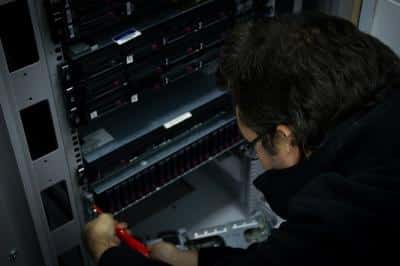
Stuart Removing Wiring

​(Stuart removing wiring in prep for moving of SAN)

Why the Change?

The main reason for this change in infrastructure is due to the rapid growth we’ve been experiencing recently along with our customers’ needs for faster backups and restores, as such, an upgrade was needed. Also, as mentioned before, this also increases our potential to deal with higher demands going forwards. So the change is an all-round improvement for everyone!


Stuart re-installing racks

(Stuart re-installing racks)

Data Protection

As always, all data that you send to us is encrypted and stored in our Sheffield Data Centre, it will never leave the UK. So you can rest easy knowing your data is being kept safe in our hands*. For more details on our Data Protection policies, how we fit into General Data Protection Regulation (GDPR) guidelines and to find out more about how your data is kept safe, visit the privacy policy page on our website: https://hahosting.com/Privacy-Policy

Tech Specs:

Here’s a quick rundown of some of the technical specifications for you more tech-minded folk:

  • HP P2000
  • 98 disk slots available
  • 4 x 10Gbit interfaces
  • 4 x direct attached to cloud nodes – 10Gbit dedicated interface for each node
  • A+B Power
  • 20Gbit link to existing Data Centre

Want to Know More About What We Can Do for You?

If you have any questions about our new Backup set up and how it could potentially be used to benefit your business, you can click here to find the relevant information to get in touch with us. We are more than happy to answer any questions or queries you may have.

For more information on our Online Backup or any of our other services you can visit our website:

hahosting.com

*It’s literally impossible to hold the actual data in your hands.

Filed Under: HA Hosting News, HA Hosting Technical Blog

Backup – Can It Save Your Business?

20/11/2018 by Chris Allen


Will Data Loss Be The Downfall Of Your Business?

Not having a backup strategy is never a good idea for a business.

Data loss can be the cause of devastating issues for business of all sizes, with potentially crippling aftereffects.

The worst part of data loss is that it can happen at any time, to anyone without any warning. Have you ever given any thought to what would happen to your business if you were hit by unexpected data loss? In a best-case scenario, it can be frustrating, and in a worst-case scenario the results can be devastating. Particularly if you’re business is dependant on that data, like databases of customer information or internal resources used by yourself or staff regularly. Imagine the potential cost, not just monetary but the potentially considerable time it would take to get back to your current point. Would your downtime cause new customers not to be able to use you? Or maybe existing customers might leave because they need the service regularly?


How Can I Prevent This?

The solution is quite simple. Backup your data. Backing up your data on a regular basis should be part of any business’, no matter the size, standard operating procedure. It’s one of the best ways of protecting your business’ data. This can be particularly important for small businesses where all your data could be stored on one machine or server.

data-loss

Can’t Backups Take A Long Time?

This really depends on the amount of data that needs copying over, but initially yes. However, most backups after the initial backup will only copy over any additional changes from the data it already has, meaning the backup time will be significantly lower. Plus, it’s worth considering if the time you’d save by not doing backups outweighs the time you’d lose if significant data loss did happen.


I Already Backup My Data Locally.

That’s a great start and can definitely help if a machine goes down as well as letting you recover quick as it’s all internal. However, the downsides of this are that your data isn’t protected from:

  • Any fires at the location it’s kept at (such as your office)
  • Floods or other water damage
  • Theft
  • Any other unexpected occurrences such as natural disasters

Now while these happen to businesses on very rare occasions, they can happen. So if this isn’t the safest solution then what is?

background board card 82526

Externally Backing Up Of Course!

As the name suggests this entails keeping backups of your data off-site so that they can be collected in case of data loss that can’t be recovered internally, it essentially adds another level of security. Better safe than sorry right? There are two options available to use for external backups:

Physical Backups:

This involves backing up data on to physical components such as, hard drives, and moving them offsite, your backups are then as secure as the place you keep them. Having them locked away in a vault guarded by laser sharks will obviously keep your data safer than if you keep a hard drive in a drawer at home.

The Downsides to this are that physical backups need someone to manually perform and oversee them. Also even when taken somewhere are still susceptible to damage, loss and theft.

Cloud Backups:

This involves performing a backup over the internet to a cloud server. The perks of this are:

  • Convenience: It’s much more convenient to send data over the internet rather than physically moving it.
  • Unlimited Storage: Cloud servers have the potential for an almost unlimited amount of data, so you won’t have to worry about running out of space.
  • Security: Data can be encrypted before hand so that it will remain protected through all the stages of transfer and storage.
  • Cost: This can often be much cheaper than having to buy a lot of your own hardware and storage space.

The downsides of cloud backups are that you usually need to have a fast and reliable internet connection in order to make the use of it effective. A slow connection could mean a complete restore of a system could take days! Speaking to a cloud server provider will let you know if it’s worth using it or not.

How Often Should I Backup?

This entirely depends on you and your business, how much data you create and how dependant you are on that data. For example, a small local shop who only do a small number of transactions a day would need considerably less backups than a huge corporation who deal with thousands of people a day. You need to look at your business and think about how devastating it would be if you lost, let’s say a week’s worth of data. Would this cripple you? Could you easily recreate the data? Can you still function as a business without it? Whatever the time frame, we recommend keeping backups as regular as you can to avoid any issues at all.

Test Your Backups!

Once you’ve decided on a backup system that’s right and works for you, the next thing to keep in mind is to test it regularly. This is another added security step; make sure it all works with your current/any new hardware you might have. Believe me you’d rather find out you need to change something now rather than trying to backup in an emergency only to find there is something stopping it!


How Much Value Does It Provide me?

Again, this very much depends on your business, it’ll be different for everyone. The best way to determine this is to think about how data loss would affect your business. How long could you operate without it? Could you recreate the data? If so, how long would that take? How heavily do you depend on the data that’s missing? When you can answer those, you’ll have more of an idea of the value backups have to you.

What’s a Data Centre?

A data centre is a place where the infrastructure and security are already set up professionally. They’ll be able to make sure your data is kept safe and sound. This option can often be cost effective and can also make the backup procedure much simpler, as you’ll be in the hands of experts who do this every day.

If you would like to learn more about what we do here in our data centre then you can get in touch with us here. Alternatively you can also message us on our Facebook Page and we’ll get back to you there as soon as we can.


Filed Under: HA Hosting Technical Blog

Watertight Marketing & HA

09/11/2018 by Chris Allen

Watertight MarketingA Watertight Idea

It’s been another busy week for me here at HA Hosting. My week started with a trip to Birmingham for the first masterclass sessions with Watertight Marketing.

For those who don’t know Watertight Marketing is both a book and company set up by the multi-award-winning Bryony Thomas. She’s renowned for her expertise in all things marketing. Bryony is personally running the sessions and giving me, advice on marketing techniques that she has perfected whilst developing Watertight Marketing. It’s safe to say that I couldn’t have anyone better coaching me.

Overall it was an enjoyable 2 days and I had a great time. I received a wealth of information from Bryony, including but not limited to how to steal your neighbour’s cat. Out of context I now realise this sounds more than a bit odd! Plus, everything was explained over in such an interesting way that you can’t help but engage and enjoy it. No wonder she’s such a sought-after public speaker!

It was a very information-intensive two days but because of how interesting it all is, it certainly flew by! Coming back from it I now have a very busy few weeks trying to start the implementation of everything into HA Hosting. I’ll be trying my best to create us a watertight plan for marketing going forwards. *

Moving Forwards with Watertight Marketing…

So, what does this mean for HA Hosting and more importantly, you? I’ll be expanding my knowledge and putting the theories and techniques taught by Bryony into practice for HA Hosting. Essentially you should be seeing more from us in the upcoming year, everything from helpful guides to general updates over social media. We want to be hearing from you as much as we can, so that we can help you in any way we can!

If you’re curious to find out more about Watertight Marketing and what it is exactly that Bryony and her team do you can look here: https://watertightmarketing.com/

You’ll be hearing from me soon no doubt. In the mean-time you’ll be able to see some more techy blog posts and hear about general updates from HA Hosting.

Have a good weekend all!

*No apologies will be made for bad puns.

Filed Under: HA Hosting News

  • « Go to Previous Page
  • Page 1
  • Interim pages omitted …
  • Page 12
  • Page 13
  • Page 14
  • Page 15
  • Go to Next Page »

Primary Sidebar

Categories

  • Blog (46)
  • HA Hosting Guides (11)
  • HA Hosting News (11)
  • HA Hosting Technical Blog (11)
  • Updates (20)

Recent Posts

  • Why More Small Businesses Are Choosing Colocation Services
  • What’s the Best Data Centre for a UK Small Business?
  • Why Virtual Servers Make Scaling a Business Easier
  • Downtime Management
  • Colocation Hosting – How to Save Money

Online Backup

Colocation

Virtual Servers

Telecoms

Contact

High Availability Hosting Limited
Holbrook Close, Sheffield, South Yorkshire, UK S20 3FJ

© 2026 High Availability Hosting Ltd. All Rights Reserved.
Company Registration No. 6491361   |   VAT Registration No.  928954962 | All Prices Subject to VAT

We use cookies to understand how visitors use our site so we can improve it. By continuing to browse you agree to this. See our privacy policy for details.