
• Skip to main content
  • Skip to primary sidebar
HAHosting Logo. Four Blue Squares. Blue text HA, Grey Text Hosting as a single word

Call Us Today 0114 228 0022

Status Page   |  Client Login   |  Support Ticket   |  Downloads

Call Us Today
0114 228 0022

Chris Allen

#6 Is Your Office 365 Data Safe?

29/01/2019 by Chris Allen Leave a Comment

You can watch our short video below summarising the blog. It’s all about keeping your Office 365 data safe!

Did you know Microsoft doesn’t backup your Office 365 data?

As unbelievable as it sounds, its true! Microsoft don’t backup your Office 365 data. Instead what they do is they replicate your data in the cloud as a redundancy feature, which helps them to comply with data retention policies. What this means is that that can make sure your data is always available in its current state. But it’s not backed up! If the original is altered or corrupted, then the replicated file will be too!

And if you’re solely relying on Office 365 features such as Legal Hold or Archiving, restoring a single (depending on the size of the file of course) can potentially take up to 6 hours. This is due to how it exports and re-imports PST files. Now imagine if you had had to restore many files or even entire accounts. This could be a ridiculous amount of time. In this time, you have the potential to lose customers as well as wasting a lot of time/productivity. However, if you were to recover with a backup already in place, that one file could take only around 5 minutes (again size dependant). I think we all agree that is a much preferable time frame!
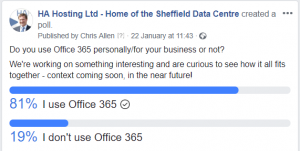
Capture

                                                                   (Survey by us, asking about who uses Office 365).

Why Do I Need a Backup?

We often hear “It’ll never happen to me” as a lot of people believe data loss is down to hackers or virus attacks. You may be surprised to hear that in fact around 75% of data loss is caused by accidental or intentional deletion (IT Compliance Policy Group). One of the biggest risks to your data that you can’t anticipate or prepare for is human error. Accidents happen. And that’s fine, there isn’t much you can do about avoiding them. What you can do however, is to have the appropriate measures in place to easily recover from them. A survey conducted by SkyKick stated that 62% of companies asked had suffered data loss due to user error. With hackers and third party software only accounting for a combined 20%.

Is the Cost Worth it?

The cost to restore a single lost file has been estimated to be equal to or more than investing in an organisation-wide backup solution for an entire year. Think about if you needed to backup more.

Not just a file or folder but a whole database. Think about the monetary and time loss. Would waiting a long timefor a file to be restored affect your business’ productivity? The cost of not having a backup solution can be very unpredictable. When weighing up the cost of having backup vs not having it, consider this:

Would you rather have a constant, low cost that meant you were protected no matter what or potentially a huge cost without warning? Like mentioned earlier it’s unpredictable and so you could result in spending hardly anything, but you could also end up spending a small fortune.


“the average predictable cost of data loss to a small business is £3936” – Skykick

A lot of people and companies who have experience with backups and data loss will tell you that it’s not a matter of “if” but “when”. Having a backup in place dramatically reduces the risk of crippling aftereffects post-data loss.

Backup maybe a constant cost, and in an ideal world you’d never have to use it. Seems silly right? Not if you do end up using it. Can your business manage losing almost £4000 if the average is to be believed? Plus, backup nowadays is usually fairly cheap and is usually always useful at some point – “when”, not “if”.


What We Recommend…

We recommend that you seriously think about whether a service that backs up your Office 365 data would be beneficial for you and your business.

If you have any questions you can always get in contact with us and we’ll do our absolute best to help you in any way we can.

Filed Under: HA Hosting Guides Tagged With: Backup, Office 365

Ransomware Protection for UK Businesses

25/01/2019 by Chris Allen Leave a Comment

Ransomware remains the single largest cyber risk to UK small and mid-sized businesses. It is not an “if” question anymore: the question is whether you can recover quickly enough that the attack does not put you out of business. This article covers what ransomware actually does, how it gets in, and the controls that work.

What ransomware does

A ransomware payload encrypts your files (often including network shares, USB drives plugged in at the time of infection, and any cloud storage syncing via a desktop client) then demands payment for the decryption key. Modern variants also steal a copy of the data first, threatening to publish it if you do not pay. The double extortion model means backups alone are no longer a complete defence, although they are still the most important one.

How it gets in

The three most common entry points in 2026 are:

  • Phishing email. An attachment or link tricks a user into running a downloader. Often well-targeted, often through a leaked supply chain (your accountant, your IT supplier, your insurer).
  • Compromised remote access. Exposed RDP, weak VPN credentials, or an MFA-less administrator account. The attacker logs in, deploys the payload manually.
  • Unpatched software. A known vulnerability in a public-facing service (VPN appliance, mail server, firewall) gets exploited. Patch lag of a few weeks is enough.

The controls that actually work

Defence in depth, in this order of impact:

1. Offsite, immutable backup

The single most important control. If your backup is on a network share that the ransomware can reach, it will encrypt that too. You need a copy offsite, immutable (cannot be deleted or modified for a retention window), and tested. Our Managed Backup Services uses Veeam with immutable repositories on our Ceph cluster in our ISO 27001 Sheffield data centre.

2. Multi-factor authentication on everything

Email, VPN, remote access, cloud admin consoles. Authenticator app or hardware key. SMS is acceptable for low-risk accounts but not for privileged ones.

3. Patch within 30 days

Operating systems, browsers, public-facing services. Automated patching where possible. The vendor’s advisory is your patch deadline, not a suggestion.

4. Email filtering with sandboxing

Microsoft 365 or Google Workspace at the Business Premium tier or above, plus a third-party email gateway if you handle frequent invoice or supplier correspondence.

5. Endpoint detection and response (EDR)

Not legacy antivirus. EDR products (Microsoft Defender for Business, CrowdStrike, SentinelOne) detect ransomware behaviour patterns, not just known signatures.

6. Network segmentation

If your finance server, your file server and your factory PLCs are all on the same flat network, ransomware spreads to all of them at the same time. Even basic VLAN segmentation slows lateral movement.

7. Tested incident response plan

Three pages of plain text: who to call, who to tell, how to isolate, how to restore. Rehearse it once a year. The middle of an attack is not when you write this.

If you are hit

Disconnect affected systems from the network immediately (cable out, not shutdown). Call your IT supplier and your cyber insurance broker. Do not pay before talking to law enforcement (NCSC’s Action Fraud, or your local police cyber unit). Restoration from a clean offsite backup is the goal, not negotiation.

Where HA Hosting fits

The first control above (offsite immutable backup) is what we do. Our Managed Backup Services covers Veeam licensing, monitoring and restore on your behalf, with the backup data immutable in our UK Sheffield data centre. If you want to run the backup tooling yourself, UK Cloud Backup from £14 per TB per month gives you the storage.

Filed Under: Blog

#5 Managed Backup Services

18/01/2019 by Chris Allen Leave a Comment

Managed Backup

Want a quick rundown on what Managed Backup is and how it can potentially help your business? Then Watch out short video guide below!

Backup for a Second

Recognising that you need a backup to secure your business’ data is fantastic! This is the first step to securing your data. Perhaps now you’re thinking over the various types of backups we’ve gone over before and how they’d best be implemented into your business.

However, unless you know what you’re doing, configuring a backup can be very complicated. There is a risk of your data still not being protected properly.

This is where the option of Managed Backup comes into play.

How Valuable is Your Data?

It’s likely only you will know what data is important and integral to your business. Unless you have a great deal of experience of configuring backup software, we recommend that you work with someone who does have that experience, when setting up your backup.

It’s important that your backup is configured correctly in order to be confident your data is being kept safe. We’ve seen cases in the past where customers have had their backup sat there for months or years – without realising that it is not working. By the time that they find out that it’s not working, they need it. At that point it is already too late.

The Right Person for the Job

Would you rather you had someone do it who’s done it once or someone who’s done it a hundred times? The people that will know the software is nearly always going to be the backup provider. So get them to set it up for you based on your data requirements.

This is important as your data’s security depends on it!

Anyone can learn how to configure a backup, but do you want them to be learning with your data? Once it is setup, remember to run regular data restore tests. Or even better get the people managing your backup to do it for you!

Managed Online Backup

Managed backup is just as it sounds. A service in which your backup is actively managed, set up in a correct way that is effective and best suits your business.

To have an effective backup strategy that works, you need the following:

  • Configured correctly by an experienced person.
  • Daily reports emailed to you and the people managing it.
  • Accurate interpretation of the reporting.
  • Proactive action and updates from the backup managers.


A lot of experience is often needed for reading the reports that are produced as often fails will get flagged, that someone who has experience can realise it’s not an issue and safely ignore it. An example of this could be a backup of your internet browser cache. This can avoid creating panic, if someone less experienced thought it was urgent. We’ve seen reports that say a backup has completed successfully when it clearly hasn’t if you had read on further into the report.

Another benefit of having someone with experience managing your backup is that they can advise on what to do and setup the backup to best suit your business. You might know the difference between a full backup and an incremental backup, or what bandwidth throttling is. But if you can’t act on that information it doesn’t matter much. Of course, if you don’t know anything like that then the benefits of having someone who sorts it are obvious.

Naturally managed backup is usually a little bit more expensive than regular backup services. If you lack someone who has the technical experience to manage it, then it could be worth the extra small investment.

What Does This Mean for my Business?

To give an example which might clarify how things will work from your perspective, we’ll briefly chat about what we at HA Hosting provide with our managed backup services.

So, like mentioned earlier, we would assess based on various factors such as:

  • Your internet speeds.
  • Type of business.
  • Amount of data produced.
  • Frequency of data produced.

From here we will advise and act on the best kind of backup suited for your business. We also manage the reporting produced from the backup, checking through anything that is flagged. If something needs fixing, then we will do that too. Of course notifying you when something has come up and has been fixed. We’re often told by customers that we identify and fix issues before the customer is even aware of it.

Peace of Mind

This all means that you can have the peace of mind. Knowing that your data is safely protected and can be used to recover from on the rare occasion something does happen. Plus, it comes with the benefit of not having to worry about the technical side to the backup if you don’t know much about it. Leaving you to focus on the things in your business that you want to focus on.

Want to Know More?

If there is something more specific you would like to know or you have a question that hasn’t been answered yet then you can contact us here, and we’ll get back to you as soon as we can!


Remember, backing up your data is easy. But it’s just as easy not to do it.

Filed Under: HA Hosting Guides Tagged With: Backup, Managed Services

#4 Backup Over Slow Internet

11/01/2019 by Chris Allen Leave a Comment

Ever wondered how backup over a slow internet connection works ? Watch our short video guide below to find some easy solutions to this issue:

Having the ability to backup your data over the internet offers convenience, utility and accessibility. Whether this is performing backups or restoring from them. However, a common concern we hear a lot is whether someone can perform online backup with a slow internet connection.

If this sounds similar to you then fear not, there are a variety of solutions to help you work around this issue. Make sure you can still be confident that your data is safely backed up! It’s important to note that on the very slowest connection it might not be possible to backup over the internet. However, this usually not the case for most connections.


Compression:

Before sending your data across it can be compressed which reduces the size of it. The more effective the level of compression, the smaller the file size is which mean it takes much less time to transfer data.


Out of Hours:

This is as simple as it sounds. Having the option to set what times of the day that backups take place. This means that backups can be set to be performed out of office hours. This means that you won’t be struggling for bandwidth with your backup. Meaning that you can use it as you want and have the backup have a dedicated time slot to avoid usage clashes. An example would be having it set so the backup only run at 8pm – 6am.


Bandwidth Throttling:

Bandwidth throttling works by restricting the amount of bandwidth that backup can use at a given time. Resulting so that it can coincide with regular use of your internet without drastically slowing down the connection. This is useful if you need to run backups in the day but have slow internet or  lots of traffic.


Local Speed Vault:

Having a local speed vault is a method of speeding up how long it takes to restore data from a backup. This works by keeping an additional copy of the backup locally, which can be used for restoring much quicker than over the internet. The caveat of this is that additional external hardware (such as an external disk or drive) is needed. Of course is an additional upfront cost you have to consider. Think about if the investment would save money (in the form of time taken) in the long run. This external hardware can be encrypted so that your data can still be kept secure.

Dedicated Internet Connection:

Like the name suggests, this means having a separate line in place that is dedicated specifically for backups. This means that traffic from your regular internet use will not impact the time it takes to backup your data. The same applies for vice versa. Another benefit of this is that the backups can send data whenever they have to. They aren’t restricted to just out of hours, for example. The obvious downside of this is the installation and rental costs. It’s worth considering if this will save you money/time in the long run compared to not having it.


Seed Backup:

Sometimes the initial full backup is too much for the internet to handle. An easy way to see this would be if the backup was predicted to take an abnormal amount of time or slowed down internet speeds drastically to unusable standards. A way of getting around this is by performing a seed backup.

A seed backup consists of transferring the data to a physical disk, which can then be transferred physically to a data centre like ours and imported in to the backup system. After this all changes made will then be added to the backup incrementally via the internet. An example would be to have 1TB on a disk, physically given to us and then from that point only the changes are sent over (incremental backup) on the internet which normally are much smaller and manageable.


If you have a question or need some help with backup you can always get in contact with us and we’ll do our absolute best to help you in any way we can.


Filed Under: HA Hosting Guides

#3 Why People Don’t Backup

04/01/2019 by Chris Allen Leave a Comment


Now that we’ve been over the basics of backup and what the most common types of backup are used for, the next thing we would like to address are some of the reasons why people don’t backup their data. People can use alternative methods what can often be confused for forms of backup. Below you can find our short video guide which can help you avoid falling into the trap of this.

File Replication Software

People will use file replication software that is often synchronised automatically with your files on your computer, in order to create a copy of whatever you want. This is often over the internet through cloud-based software/storage (examples of this are Dropbox, Office 365, Google Drive and iCloud) Because of this people can think that this is a form of online backup. Unfortunately this is not the case.

Due to how this type of software works, the ability to automatically sync with your files, can actually work against you. An example of this would be if the original data was corrupted or edited, the synced file will be also. Some software offers versioning, which can help avoid this issue. However, it’s important to keep in mind that this isn’t backup!

Let’s say you lose your data/it gets corrupted, and so following this you try to log in to your cloud account and find you’re locked out for whatever reason. You can now no longer access this data, potentially leaving you stuck. The same situation can be applied to if you’re data is encrypted by a virus or your account is hacked. All of these leave you with possibility with having lost your data. And while it is unlikely to happen, it definitely can. Is it worth risking?

Using real backup methods can avoid this all together.

RAID Setup

Depending on how techy you are this one will either make a lot of sense, or not much at all.  So, to cover all bases, here is a brief summary of what a RAID setup is:

RAID stands for Redundant Array of Independent Disks and is essentially a setup of disks that is used to ensure reliability and constant uptime – typically used for things such as servers. A server will run on a set of disks and it can afford to lose access to a disk but continue to work. Allowing for you to fix the issue with the first disk whilst also making sure regular service carries on. These setups can be scaled up to contain many disks, used by big companies and data centres.

Now we’ve roughly gone over what a RAID is, we can say why it’s not a form of backup. This is a fairly common misconception if you’re unfamiliar with it. It might seem obvious, but RAIDs are very useful for countering hardware errors and ensuring reliability. However, they don’t backup your data they just keep the hardware your data is on running.

An easy way of explaining why people can be confused by this is that it can be described as like having a backup disk to run off. If your data is corrupted or lost on a RAID system it can’t be recovered from it. RAID would just make sure that it’s always accessible physically.

So, if the data on the RAID is corrupted then you’re a bit stuck.

A Company/Software I Use Stores it for Me

This is where a service you use will store the data on their end, and according to GDPR guidelines, it will normally be kept safe. On top of this companies that store large amounts of data should be backing this up on their end too. Normally this would be fine if the service runs as normal.

This however can really throw people off if for whatever reason that service is disrupted. It could be as simple as a communication error, or something as serious as data corruption or loss on their end. In both cases you won’t have access to your data. This can be detrimental if you need the data for something time sensitive.

Independently backing up your data acts as an extra layer of reliability and security.

An example of this is that we personally use an accountancy software where the provider stores the data, but on top of this we also backup the same data elsewhere. In the rare case we can’t access it via the software we have the peace of mind that we can access it when we need to.

This is particularly helpful for data we might need to keep for legal compliance reasons. This way we know we’re covered for definite. It’s worth thinking if spending a small amount is something you’d be willing to do for the extra security and peace of mind.

Filed Under: HA Hosting Guides

Christmas at HA Hosting 2018

21/12/2018 by Chris Allen Leave a Comment

Happy Holidays Everyone!

It’s that time of year again where everyone is counting down the days until a bit of well-deserved time off! Here at HA Hosting we’re all looking forward to relaxing and spending a good few days eating, pulling crackers and enjoying some time with friends and family!
As you can see we’ve all been donning the traditional Christmas jumper this week, making things a little more festive around the data centre!

4

Opening Times over Christmas

  • Saturday 22nd December – Emergency access / support only
  • Sunday 23rd December – Emergency access / support only
  • Monday 24th December – No escorted access / Emergency infrastructure support only
  • Tuesday 25th December – No escorted access / Emergency infrastructure support only
  • Wednesday 26th December – No escorted access / Emergency infrastructure support only
  • Thursday 27th December – Normal office / escorted access hours until 17:00
  • Friday 28th December – Normal office / escorted access hours until 17:00
  • Saturday 29th December – Emergency access / support only
  • Sunday 30th December – Emergency access / support only
  • Monday 31st December – Normal office / escorted access hours until 14:00
  • Tuesday 1st January – No escorted access / Emergency infrastructure support only
  • Wednesday 2nd January – Normal hours from 08:00 to 18:00

If you need an emergency support call 0114 2280022, then select option 2. As a heads up, you will be charged an out of hours callout if the issue is not data centre infrastructure related.

  • Anyone with 24×7 access, you can continue as normal, nothing will change here.
  • Customers with 24x7x365 support contacts continue as normal, simply call the usual number, option 2.

Festive Feeling

We hope that you all have a nice Christmas and New Year lined up and spend some time relaxing and enjoying yourselves before we all start backup working hard in the new year! We’ll be a little quiet on the website and social media over the next week but will be back in full-force come January 2nd! We’ve got a lot of exciting changes coming early next year and can’t wait to start working on them to make your overall experience better! But until then…


Wishing you all a Merry Christmas and a Happy New Year,

From the HA Hosting Team.

Filed Under: HA Hosting News

  • « Go to Previous Page
  • Page 1
  • Interim pages omitted …
  • Page 11
  • Page 12
  • Page 13
  • Page 14
  • Page 15
  • Go to Next Page »

Primary Sidebar

Categories

  • Blog (46)
  • HA Hosting Guides (11)
  • HA Hosting News (11)
  • HA Hosting Technical Blog (11)
  • Updates (20)

Recent Posts

  • Why More Small Businesses Are Choosing Colocation Services
  • What’s the Best Data Centre for a UK Small Business?
  • Why Virtual Servers Make Scaling a Business Easier
  • Downtime Management
  • Colocation Hosting – How to Save Money

Online Backup

Colocation

Virtual Servers

Telecoms

Contact

High Availability Hosting Limited
Holbrook Close, Sheffield, South Yorkshire, UK S20 3FJ

© 2026 High Availability Hosting Ltd. All Rights Reserved.
Company Registration No. 6491361   |   VAT Registration No.  928954962 | All Prices Subject to VAT

We use cookies to understand how visitors use our site so we can improve it. By continuing to browse you agree to this. See our privacy policy for details.