
• Skip to main content
  • Skip to primary sidebar
HAHosting Logo. Four Blue Squares. Blue text HA, Grey Text Hosting as a single word

Call Us Today 0114 228 0022

Status Page   |  Client Login   |  Support Ticket   |  Downloads

Call Us Today
0114 228 0022

Backup

#6 Is Your Office 365 Data Safe?

29/01/2019 by Chris Allen Leave a Comment

You can watch our short video below summarising the blog. It’s all about keeping your Office 365 data safe!

Did you know Microsoft doesn’t backup your Office 365 data?

As unbelievable as it sounds, its true! Microsoft don’t backup your Office 365 data. Instead what they do is they replicate your data in the cloud as a redundancy feature, which helps them to comply with data retention policies. What this means is that that can make sure your data is always available in its current state. But it’s not backed up! If the original is altered or corrupted, then the replicated file will be too!

And if you’re solely relying on Office 365 features such as Legal Hold or Archiving, restoring a single (depending on the size of the file of course) can potentially take up to 6 hours. This is due to how it exports and re-imports PST files. Now imagine if you had had to restore many files or even entire accounts. This could be a ridiculous amount of time. In this time, you have the potential to lose customers as well as wasting a lot of time/productivity. However, if you were to recover with a backup already in place, that one file could take only around 5 minutes (again size dependant). I think we all agree that is a much preferable time frame!
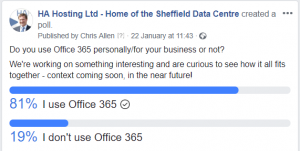
Capture

                                                                   (Survey by us, asking about who uses Office 365).

Why Do I Need a Backup?

We often hear “It’ll never happen to me” as a lot of people believe data loss is down to hackers or virus attacks. You may be surprised to hear that in fact around 75% of data loss is caused by accidental or intentional deletion (IT Compliance Policy Group). One of the biggest risks to your data that you can’t anticipate or prepare for is human error. Accidents happen. And that’s fine, there isn’t much you can do about avoiding them. What you can do however, is to have the appropriate measures in place to easily recover from them. A survey conducted by SkyKick stated that 62% of companies asked had suffered data loss due to user error. With hackers and third party software only accounting for a combined 20%.

Is the Cost Worth it?

The cost to restore a single lost file has been estimated to be equal to or more than investing in an organisation-wide backup solution for an entire year. Think about if you needed to backup more.

Not just a file or folder but a whole database. Think about the monetary and time loss. Would waiting a long timefor a file to be restored affect your business’ productivity? The cost of not having a backup solution can be very unpredictable. When weighing up the cost of having backup vs not having it, consider this:

Would you rather have a constant, low cost that meant you were protected no matter what or potentially a huge cost without warning? Like mentioned earlier it’s unpredictable and so you could result in spending hardly anything, but you could also end up spending a small fortune.


“the average predictable cost of data loss to a small business is £3936” – Skykick

A lot of people and companies who have experience with backups and data loss will tell you that it’s not a matter of “if” but “when”. Having a backup in place dramatically reduces the risk of crippling aftereffects post-data loss.

Backup maybe a constant cost, and in an ideal world you’d never have to use it. Seems silly right? Not if you do end up using it. Can your business manage losing almost £4000 if the average is to be believed? Plus, backup nowadays is usually fairly cheap and is usually always useful at some point – “when”, not “if”.


What We Recommend…

We recommend that you seriously think about whether a service that backs up your Office 365 data would be beneficial for you and your business.

If you have any questions you can always get in contact with us and we’ll do our absolute best to help you in any way we can.

Filed Under: HA Hosting Guides Tagged With: Backup, Office 365

#5 Managed Backup Services

18/01/2019 by Chris Allen Leave a Comment

Managed Backup

Want a quick rundown on what Managed Backup is and how it can potentially help your business? Then Watch out short video guide below!

Backup for a Second

Recognising that you need a backup to secure your business’ data is fantastic! This is the first step to securing your data. Perhaps now you’re thinking over the various types of backups we’ve gone over before and how they’d best be implemented into your business.

However, unless you know what you’re doing, configuring a backup can be very complicated. There is a risk of your data still not being protected properly.

This is where the option of Managed Backup comes into play.

How Valuable is Your Data?

It’s likely only you will know what data is important and integral to your business. Unless you have a great deal of experience of configuring backup software, we recommend that you work with someone who does have that experience, when setting up your backup.

It’s important that your backup is configured correctly in order to be confident your data is being kept safe. We’ve seen cases in the past where customers have had their backup sat there for months or years – without realising that it is not working. By the time that they find out that it’s not working, they need it. At that point it is already too late.

The Right Person for the Job

Would you rather you had someone do it who’s done it once or someone who’s done it a hundred times? The people that will know the software is nearly always going to be the backup provider. So get them to set it up for you based on your data requirements.

This is important as your data’s security depends on it!

Anyone can learn how to configure a backup, but do you want them to be learning with your data? Once it is setup, remember to run regular data restore tests. Or even better get the people managing your backup to do it for you!

Managed Online Backup

Managed backup is just as it sounds. A service in which your backup is actively managed, set up in a correct way that is effective and best suits your business.

To have an effective backup strategy that works, you need the following:

  • Configured correctly by an experienced person.
  • Daily reports emailed to you and the people managing it.
  • Accurate interpretation of the reporting.
  • Proactive action and updates from the backup managers.


A lot of experience is often needed for reading the reports that are produced as often fails will get flagged, that someone who has experience can realise it’s not an issue and safely ignore it. An example of this could be a backup of your internet browser cache. This can avoid creating panic, if someone less experienced thought it was urgent. We’ve seen reports that say a backup has completed successfully when it clearly hasn’t if you had read on further into the report.

Another benefit of having someone with experience managing your backup is that they can advise on what to do and setup the backup to best suit your business. You might know the difference between a full backup and an incremental backup, or what bandwidth throttling is. But if you can’t act on that information it doesn’t matter much. Of course, if you don’t know anything like that then the benefits of having someone who sorts it are obvious.

Naturally managed backup is usually a little bit more expensive than regular backup services. If you lack someone who has the technical experience to manage it, then it could be worth the extra small investment.

What Does This Mean for my Business?

To give an example which might clarify how things will work from your perspective, we’ll briefly chat about what we at HA Hosting provide with our managed backup services.

So, like mentioned earlier, we would assess based on various factors such as:

  • Your internet speeds.
  • Type of business.
  • Amount of data produced.
  • Frequency of data produced.

From here we will advise and act on the best kind of backup suited for your business. We also manage the reporting produced from the backup, checking through anything that is flagged. If something needs fixing, then we will do that too. Of course notifying you when something has come up and has been fixed. We’re often told by customers that we identify and fix issues before the customer is even aware of it.

Peace of Mind

This all means that you can have the peace of mind. Knowing that your data is safely protected and can be used to recover from on the rare occasion something does happen. Plus, it comes with the benefit of not having to worry about the technical side to the backup if you don’t know much about it. Leaving you to focus on the things in your business that you want to focus on.

Want to Know More?

If there is something more specific you would like to know or you have a question that hasn’t been answered yet then you can contact us here, and we’ll get back to you as soon as we can!


Remember, backing up your data is easy. But it’s just as easy not to do it.

Filed Under: HA Hosting Guides Tagged With: Backup, Managed Services

Primary Sidebar

Categories

  • Blog (45)
  • HA Hosting Guides (11)
  • HA Hosting News (11)
  • HA Hosting Technical Blog (11)
  • Updates (20)

Recent Posts

  • What’s the Best Data Centre for a UK Small Business?
  • Why Virtual Servers Make Scaling a Business Easier
  • Downtime Management
  • Colocation Hosting – How to Save Money
  • What is Single Server Colocation Hosting?

Online Backup

Colocation

Virtual Servers

Telecoms

Contact

High Availability Hosting Limited
Holbrook Close, Sheffield, South Yorkshire, UK S20 3FJ

© 2026 High Availability Hosting Ltd. All Rights Reserved.
Company Registration No. 6491361   |   VAT Registration No.  928954962 | All Prices Subject to VAT

We use cookies to understand how visitors use our site so we can improve it. By continuing to browse you agree to this. See our privacy policy for details.