
• Skip to main content
  • Skip to primary sidebar
HAHosting Logo. Four Blue Squares. Blue text HA, Grey Text Hosting as a single word

Call Us Today 0114 228 0022

Status Page   |  Client Login   |  Support Ticket   |  Downloads

Call Us Today
0114 228 0022

Chris Allen

Why is Having Your Own IP Range Useful?

24/05/2019 by Chris Allen Leave a Comment

Why is Having Your Own IP Range Useful?

In this blog post we’ll be going over why having your own IP Ranges are useful. To give context, we’ll explain what RIPE and LIR’s are, and how this impacts use of IP addresses. 

Let’s Start from the Top – RIPE 

There is only a set amount of IP addresses in the world. They are monitored and overseen by non-profit organisations across the world. These organisations cover different set regions. RIPE (Réseaux IP Européens) oversee and delegate IP’s for Europe, the Middle East and some central parts of Asia. They hold a vast number of IP’s. 

Essentially, we are starting to run out of IP’s as more and more devices and places need them. As such, RIPE now only allocate IP’s to LIR’s (Local Internet Registry). An LIR will be allocated a certain amount of IP’s and can essentially do what they want with them. They have to get used though! This could be Data Centres that need a large amount of IP’s to set up servers for customers. To become an LIR you must demonstrate competency through a series of forms and meeting certain conditions. If you’re successful RIPE will allocate a set block of IP’s – a block of 1024 for example. 


LIR’s 

As mentioned above an LIR is an organisation that has joined RIPE and been allocated an amount of IP’s, which that person/company will own and can do what they want with. An example would be a Data Centre like us. We will allocate IP addresses to our customers for various things such as servers and website hosting. 


Why Have Your Own IP Range? 

You might be thinking “why can I not just use the IP’s that my ISP (Internet Service Provider) give me?”. That’s a good question and why there is nothing wrong with doing that providing you stay with them. If you ever decide to swap providers or leave it becomes much more of a faff as your ISP will take back their IP’s (remember there is only a set amount available). This becomes problematic as it means you need to get new IP’s and allocate them to whatever services were using them before. This is usually a bit of a pain. 

So, when you have your own IP’s you can use them wherever you like. This is option is a lot more flexible and has much more utility. It also means you aren’t tied down to one location too. Another big benefit to having your own IP(s) is that they build up reputations slowly. For example, if your business was email marketing and you sent thousands of emails a day, a brand-new IP might be seen as suspicious and blacklisted, meaning more people wouldn’t see your emails. The flipside of this is also true. An IP with a good reputation is less likely to get blacklisted in the same situation. Having your own IP means you can more easily manage your reputation over time. 

Following from the previous point, having your own IP’s means you are only affected by what you do, as opposed to sharing IP’s on shared hosting services. Essentially if someone on that shared hosting network’s website gets hacked and sends out a load of spam, other sites on that shared host may get blacklisted too as it is done by IP address. 


IP Trading 

Additionally, there is also a market for trading IP addresses, so you can buy or rent IP addresses from third parties. You may even be able to buy a PI (Provider Independent) range which are no longer available. A PI range gives you your own IPs but without the need to become an LIR, i.e. member of RIPE, so this is an easier and cheaper option. The reason that they are no longer available is because RIPE is on its last block of IP addresses and its constitution says that all addresses much now only go to members. 


Got a Question? 

We appreciate if you aren’t familiar with this subject it can seem a little overwhelming and is a lot to try and understand. But if you want to find out more about RIPE, LIR’s or IP’s in general then don’t be afraid to get in touch! We’ll help out however we can! 


Keep up to date with us on Social Media: 
Facebook 

Twitter 

LinkedIn 

Filed Under: Blog Tagged With: IP, IP Range, LIR (Local Internet Registry), PI, RIPE

Plesk 17 Migration Update (May 2019)

22/05/2019 by Chris Allen Leave a Comment

Plesk 17 Migration Update (May 2019)

Hey all, we hope you’re well! Here is another quick update on something that’s happened behind the scenes at here at HA Hosting this past week. In this past week we were hard at work and have migrated websites to a shiny new server running Plesk 17.


The benefits following this migration are: 

  • Ensure that you can run the latest applications including a newer version of Maria DB (version 10.3) 
  • It allows for the latest versions of PHP to be available for websites 
  • The performance of the server is noticeably much better due to these improvements

As a quick summary, the old server was running Plesk 12 so wouldn’t have been supported for too much longer. This mixed with the fact that a newer server would run faster meant an upgrade was in need! Hence the migration to Plesk 17. 

The upgrades mentioned above are great and means that we should be good for awhile now! And having the server’s performance be improved is always a good thing! When is a faster server ever bad? 😉

If there are any developments to do with either this or anything we decide to change/improve then we’ll be sure to let you know as and when they happen! We’re always looking to find ways to improve what we do here, so expect updates every so often! It’s important to us to keep you in the loop with what’s going on here!

If you have any questions about what we’ve been doing, then don’t be afraid to ask! We’re more than happy to have a quick chinwag! Or if you’re just looking to keep up to date on what’s going on you can find out either on our website or on our social media pages.


We’ll see you for next update some time soon!


Cheers, 

The HA Hosting Team 

Filed Under: Updates Tagged With: 2019, Migration, Plesk, Update, Website

11 Things to Know About Server Colocation in the UK

16/05/2019 by Chris Allen Leave a Comment

Server colocation looks simple on paper: rent a slot in a data centre, install your server, plug in power and network, done. In practice, there are a handful of things that catch new colocation customers out. Here are eleven things to know before you sign a contract.

1. What you actually get

Space (1U through to a full 45U rack), power (typically two redundant A+B feeds), cooling, IP transit, physical security and 24/7 site access. Your hardware, your operating system, and your applications stay your responsibility.

2. Power is sized in kilowatts, not amps

Modern servers draw more power than they used to. A common mistake is sizing colocation by rack units when the kW envelope is the real ceiling. Ask your provider how many kW you can draw per cabinet, not just how many U you have. We size quarter, half and full rack plans by both.

3. A+B power redundancy is standard, not optional

Two independent power feeds per cabinet, each backed by UPS and generator. If your server only has one PSU, you are wasting half the resilience you are paying for. Dual PSU server hardware is cheap insurance.

4. Network bandwidth is usually included, but with caveats

Most UK colocation plans include a 100 Mbit or 1 Gbit port with a sensible monthly traffic allowance. Check whether the allowance is fair-use, 95th-percentile billed, or a hard cap. Ours is unmetered on standard ports with no surprise bills.

5. Cooling is hot aisle / cold aisle, not just AC

Modern data centres use hot/cold aisle containment to keep server intakes at a stable temperature. You may be asked to install blanking panels in unused U so airflow stays correct. Worth checking before you ship hardware.

6. Physical security is layered

Reception with photo ID, mantrap, biometric or key card access, internal CCTV, locked cages. For ISO 27001 compliance, all of this matters and you should ask to see the auditor’s report.

7. 24/7 access exists, but is by appointment

You can visit your hardware day or night, but you book the slot in advance so the on-site team is expecting you. Walking in unannounced is not a thing. Bring photo ID, sign the visitor log.

8. Remote hands is the unsung hero

Most colocation contracts include 15 to 30 minutes of remote hands per month. Use it for power-cycling a stuck server, swapping a hot-spare drive, checking a cable, reading a console message. Anything beyond the included allowance is billed per 15 minutes.

9. IP allocation is small and justified

RIPE policy means IPv4 allocations are tight. Plan to use one or two public IPv4s per server, ideally with proper IPv6 dual-stack on top, not a /29 just because you asked. Justification on the order form is normal and required.

10. ISO 27001 matters more than ever

If your customers ask where their data lives, ISO 27001 certification on the facility is the answer they want. UK-based, audited yearly, evidence of physical, network and personnel security controls. Worth paying a little more for.

11. Pricing is monthly, with a few add-ons

Most reputable UK providers price colocation as a flat monthly fee per cabinet size, with extras for extra power, extra IPs, cross-connects or significant remote hands work. Avoid anything with a setup fee on basic plans, or anything that locks you in for years.

Where to start

If you are sizing your first colocation, look at our Single Server Colocation (1U to 4U) for compact deployments, or Quarter Rack Colocation from £162.50 per month if you have 5U or more. Both run from our UK Sheffield ISO 27001 data centre, with the 24/7 access, A+B power, remote hands and Tier 1 network described above.

Filed Under: Blog Tagged With: Colocation

Update: Electrics & UPS (May 2019)

09/05/2019 by Chris Allen Leave a Comment

Update: Electrics & UPS (May 2019)

Hey everyone, just a quick update about a couple things going on at HA Hosting at the minute.


We’ve been reviewing and improving the electrical infrastructure we currently have at the Data Centre. This is so we can be sure we’re always in the best possible shape!

Turns out electricity is a big part of computers – who knew?! 😉


A big part of these improvements is a couple new UPS units (Uninterruptable Power Supply) that have recently been delivered. These are currently being installed and integrated with our current power infrastructure and work with them will be hopefully be complete soon!

It’s important (especially in a data centre) to have working and reliable UPS units as they play a big part in power fail over. Basically, they keep everything powered and ticking in instances where the main power is out. They’re important to have to make sure your data and/or servers are always up!


If there are any updates with this that are worth knowing we’ll be sure to keep you in the loop!

If you have any questions or want a quick chat you can get in touch with us or catch us on social media!


Cheers,


The HA Hosting Team

Filed Under: Updates

Why Data Centre Access Matters for UK Businesses

07/05/2019 by Chris Allen Leave a Comment

When evaluating a data centre for server colocation or rack hosting, “access” gets less attention than power and network, but it matters more than you might think. Here is why being able to walk into your cabinet at 2am with confidence is part of the service you are paying for.

1. Hardware repair is faster on-site

Most issues with colocated hardware can be resolved over remote hands: a power cycle, a drive swap, a cable check. But some issues need you (or your engineer) physically present. BIOS-level work, complex hardware swaps, rebuilding a RAID controller. Being able to drive in and fix it directly is the difference between a one-hour outage and an overnight ticket.

2. Compliance auditors expect it

If your business sells to enterprise customers, regulated industries, or public sector, your customers’ auditors may insist on the right to physically inspect where their data lives. A data centre that you cannot access at all is one your customers cannot audit. ISO 27001 audits include physical security walkthroughs as standard.

3. Trust matters when things go wrong

Outages are when relationships are tested. The ability to drive 30 minutes to your data centre, walk in, see your hardware powered up, and talk face-to-face with the engineer who runs the network, is worth more than any SLA document. Every UK small business that has had a serious incident remembers the people who picked up the phone, not the people who pointed to the contract.

4. 24/7 access, not 9-to-5

Real production outages do not respect business hours. A data centre that closes at 5pm on Friday and reopens Monday morning is not somewhere your production workload should live. 24/7 access by prior arrangement, with a duty engineer reachable around the clock, is the entry standard.

5. Photo ID, escort, visitor log

Good access controls are not optional, they are the proof that physical security is real. Photo ID at reception, signed visitor log, escort to your cabinet, exit log. ISO 27001 audits explicitly check these. If you can walk in without ID, the building is not secure.

6. Pre-approved badge holders for your team

If you have multiple engineers who will visit, get them onto the approved badge holder list ahead of time. Pre-approved holders can escort their own colleagues, which speeds up multi-engineer maintenance windows. Removing leavers from this list is part of your own ISO 27001 obligations, not just the data centre’s.

7. The “if something happens” question

Ask the operator: if I have to be on site at 3am on a Sunday for a production failure, what happens? The answers should be: someone meets me at reception, I show ID and sign in, they escort me to my cabinet within 15 minutes, they stay on-site while I work, they sign me out when I leave. Anything less is not 24/7 access.

8. Distance from your office

Not strictly an access feature, but worth thinking about. A data centre 200 miles from your office is fine 99% of the time, but the 1% where you need to drive there is unpleasant. Most UK small businesses find that 60-90 minutes is the comfortable maximum for the “physical visit on a bad day” scenario.

What HA Hosting offers

Our Sheffield data centre has 24/7 access by prior arrangement, photo ID and visitor log at reception, escort policy, ISO 27001 certification, and our engineers on-site to walk you to your cabinet. Most UK customers find Sheffield reachable in 60 to 90 minutes from anywhere in the Midlands or North of England. We sell UK Server Colocation with this access policy as standard, no premium tier required.

Filed Under: Blog Tagged With: Access, General

Are You Using the Wrong Type of Virtual Server?

17/04/2019 by Chris Allen Leave a Comment

Are you using the wrong type of Virtual Server?

There are two main types of Virtual Server that you can buy but many vendors aren’t clear which type they are selling. We believe you should know exactly what you’re looking into, so here’s a quick rundown of Virtual Servers.

The two main types are:

– Virtual Private Servers

– Container Based Servers


A Virtual Private Server (or VPS for short) is virtual server that has a completely separate operating system. Think of this as a “Private” installation of Windows or Linux.

A virtual server based on a Container is just a slice of an operating system, which means it’s ideal for running one task very efficiently and quickly.

It’s important to note that any one isn’t automatically better than the other. It massively depends on what exactly you are trying to do.

If you need a full operating system to run and install different pieces of software, with the best uptime then a VPS is probably the best option for you. However, if you are running a single website, on something like WordPress, and you want the very best performance then a container will give you the best results.


So, are you using the best type of Virtual Server for the job?

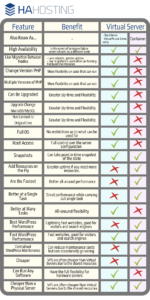
To help you figure this out we have created a check list which highlights the features/benefits of  VPS and Containers. Take a look at the bottom of this blog post!

Something to Keep in Mind:

Containers and Virtual Servers. Not everyone uses the same names in the same way.

A Container is a slice of a server operating system, as the OS is being shared you only get limited control. This is great for specific applications. If you need to make substantial changes then you may need to build a new VPS.

A Virtual Server is not shared. So you have full control over the operating system, in a similar way to having a hardware server.  


If you have any questions or want to find out more about Virtual Servers, then you can get in touch with us here.

Find us on social media:

Facebook

Twitter

LinkedIn


VPS vs Container guide

Filed Under: Blog

  • « Go to Previous Page
  • Page 1
  • Interim pages omitted …
  • Page 9
  • Page 10
  • Page 11
  • Page 12
  • Page 13
  • Interim pages omitted …
  • Page 15
  • Go to Next Page »

Primary Sidebar

Categories

  • Blog (46)
  • HA Hosting Guides (11)
  • HA Hosting News (11)
  • HA Hosting Technical Blog (11)
  • Updates (20)

Recent Posts

  • Why More Small Businesses Are Choosing Colocation Services
  • What’s the Best Data Centre for a UK Small Business?
  • Why Virtual Servers Make Scaling a Business Easier
  • Downtime Management
  • Colocation Hosting – How to Save Money

Online Backup

Colocation

Virtual Servers

Telecoms

Contact

High Availability Hosting Limited
Holbrook Close, Sheffield, South Yorkshire, UK S20 3FJ

© 2026 High Availability Hosting Ltd. All Rights Reserved.
Company Registration No. 6491361   |   VAT Registration No.  928954962 | All Prices Subject to VAT

We use cookies to understand how visitors use our site so we can improve it. By continuing to browse you agree to this. See our privacy policy for details.